pi-for-word
Pi4Word
Pi4Word is a Microsoft Word task pane add-in that embeds a Pi Agent-powered assistant using @mariozechner/pi-agent-core.
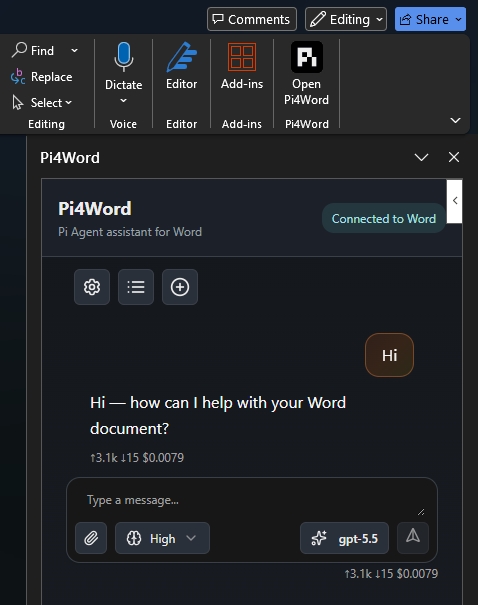
For architecture, runtime behavior, tools, storage, and streaming details, see SPECS.md.
Manifests
| File | Purpose | Task pane URL |
|---|---|---|
manifest.production.xml |
Production usage in Word | https://damianofalcioni.github.io/pi-for-word/public/index.html |
manifest.xml |
Local development and Word sideloading | https://localhost:3000/public/index.html |
Requirements
- Node.js and npm for local development
- Desktop Microsoft Word for local sideloading
- HTTPS on
https://localhost:3000for local development
Production Usage
Use manifest.production.xml to load the production add-in in Word. This manifest points Word to the public GitHub Pages build at https://damianofalcioni.github.io/pi-for-word/public/.
Word on the Web
- Open a document in Word on the web.
- Open Insert > Add-ins > Advanced….
- Choose Upload My Add-in.
- Select
manifest.production.xml.
After the add-in is loaded, use Open Pi4Word from the Word ribbon.
Word on Windows (Workaround)
- Run
npx -y office-addin-debugging start manifest.production.xml desktop --app word
Pi4Word is available under Home > Add-ins > Developer Add-ins.
Word on Windows (Official)
- Create a local folder for the add-in catalog, for example
C:\OfficeAddinCatalog. - Copy
manifest.production.xmlinto that folder. - Right-click the folder, open Properties > Sharing > Advanced Sharing, enable Share this folder, and make sure your Windows user has at least read access.
- Copy the folder’s network path from the Sharing tab, for example
\\YOUR-PC\OfficeAddinCatalog. Use this network path in Word, not the localC:\...path. - In Word, open File > Options > Trust Center > Trust Center Settings > Trusted Add-in Catalogs.
- Paste the network path into Catalog Url, select Add catalog, enable Show in Menu for that catalog, select OK, then restart Word.
- Open Home > Add-ins > Shared Folder, select Pi4Word, and add it to the document.
After the add-in is loaded, use Open Pi4Word from the Word ribbon.
Local Development
npm install
npm run build
npm run cert        (windows only)
npm run word
npm run word starts the HTTPS dev server and sideloads manifest.xml into Word.
Build
npm run build
The build runs tests, linting, and scripts/esbuild.mjs. Output is written to public/, including:
public/index.htmlpublic/index.min.jspublic/index.min.css- copied runtime assets under
public/assets/andpublic/pdfjs-dist/
Scripts
| Command | Description |
|---|---|
npm run cert |
Creates local HTTPS certificate material on Windows. |
npm run serve |
Serves the repository over HTTPS on port 3000. |
npm run word |
Starts Word sideloading with manifest.xml. |
npm run test |
Runs Node tests. |
npm run eslint |
Runs ESLint. |
npm run esbuild |
Bundles the task pane into public/. |
npm run build |
Runs tests, linting, and bundling. |
License
MIT